

What it does
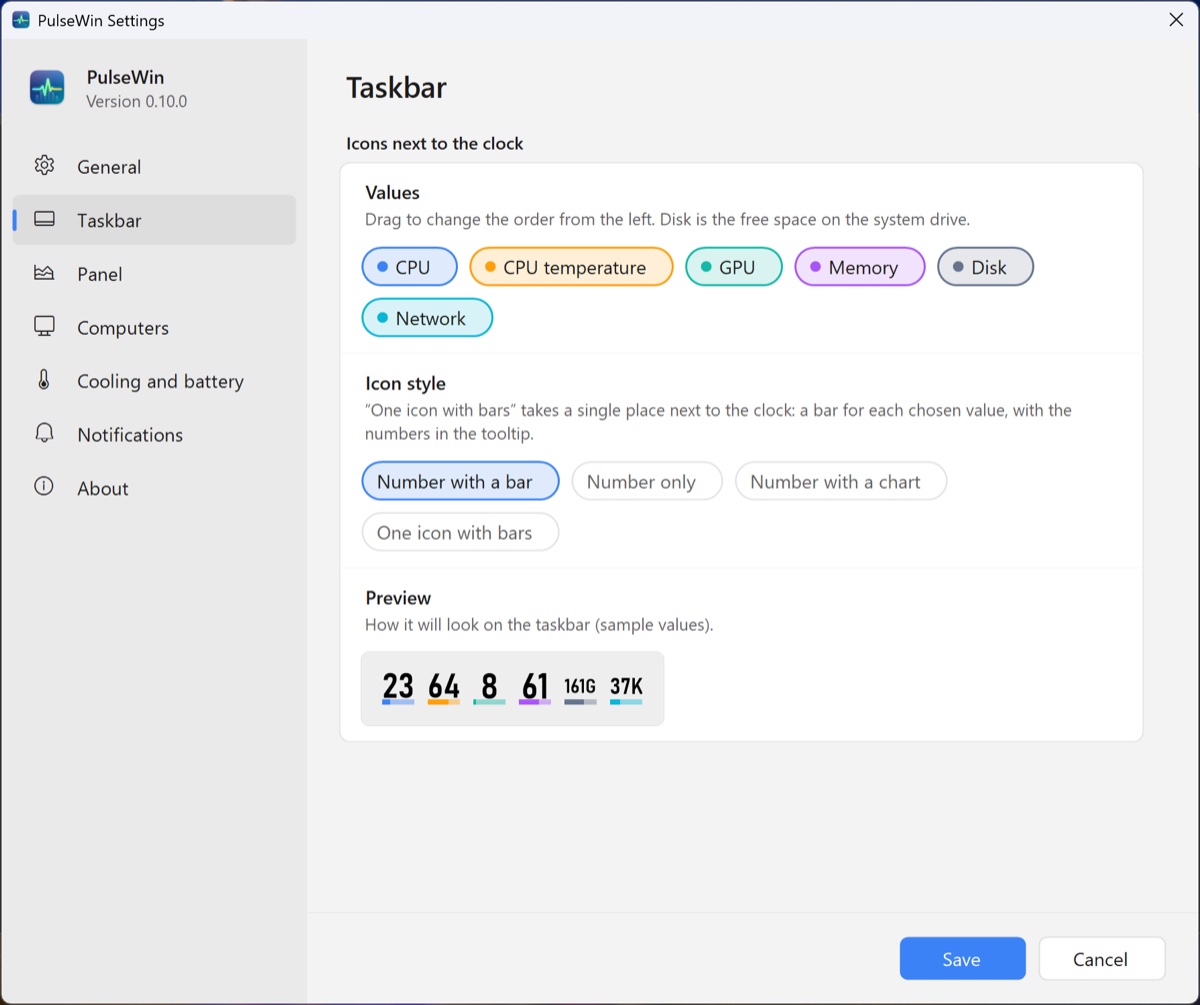
PulseWin lives in the tray next to the clock. Each value you pick is its own icon with a number: CPU, memory, GPU, CPU temperature, network download or free disk space. Drag them in Settings to change their order. PulseWin makes sure Windows doesn't hide them behind the arrow.
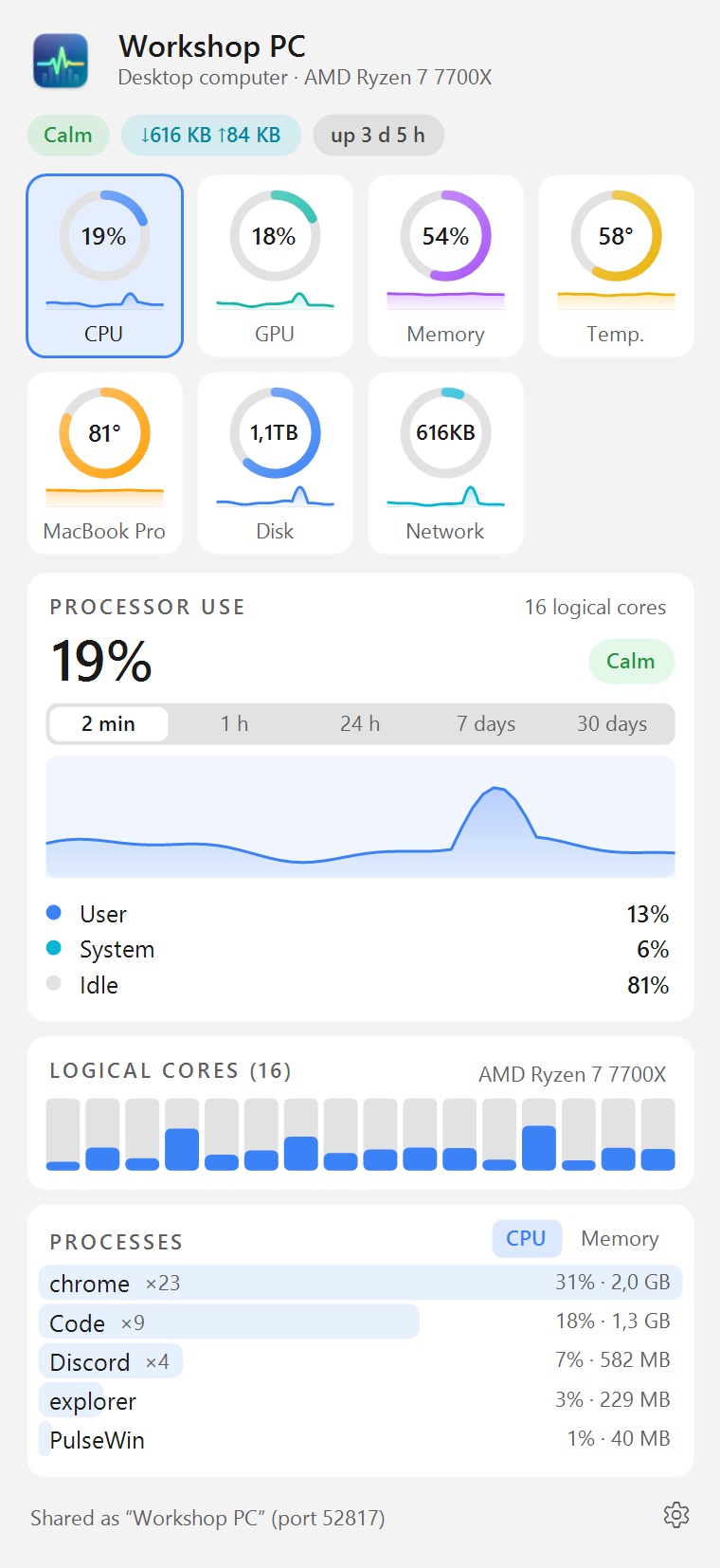
Clicking an icon opens the panel. At the top are tiles with rings and small charts, and each one is a tab with details below it:
- CPU: a chart of the last minutes, the load of every core and the processes using the most CPU.
- GPU and Memory: charts, committed memory and the programs using the most of it.
- Temperature: CPU, graphics card and drives, NVIDIA fan, power draw.
- Disk: free space on each drive, reads and writes.
- Network: download and upload, the connection, the local network address.
- Battery on laptops: charge and time left.
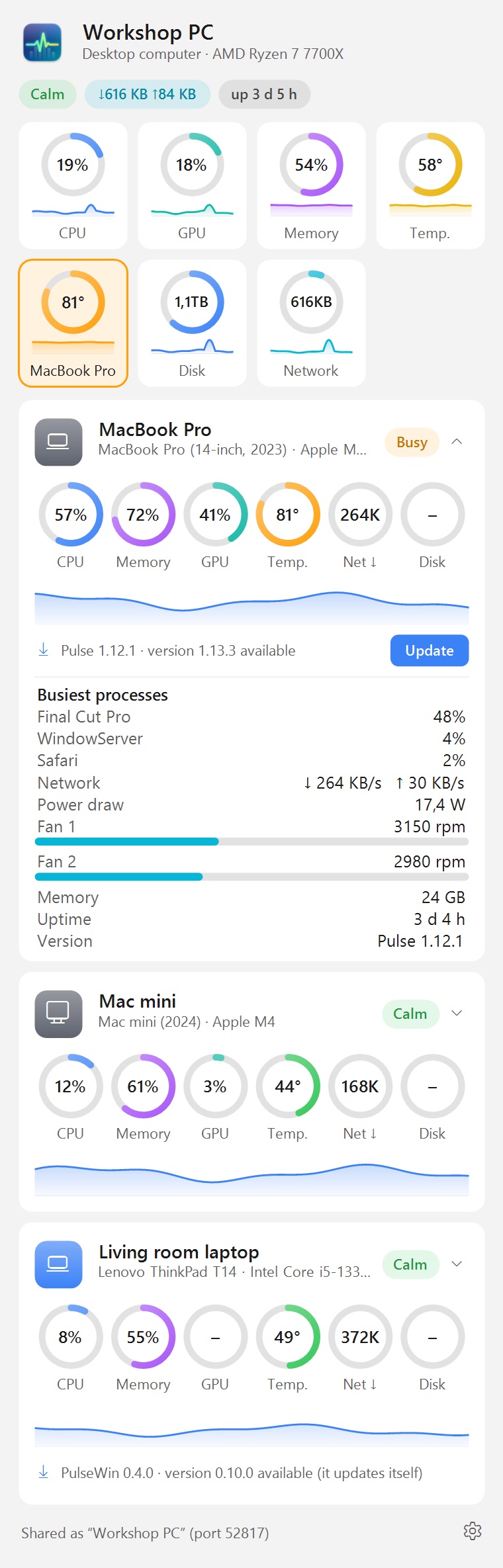
- Computers: Macs running Pulse and other PCs running PulseWin as cards with rings. Click a card for more: processes, Docker containers, network, fans, power draw.
Hover over a chart to see the time and value at that point. The panel always keeps the same height, so the tiles stay put under the mouse; scroll with the wheel for what doesn't fit.
The Battery tab also shows battery health (current and design capacity, cycle count), and the Disk tab drive health from SMART. In Settings you can limit Turbo Boost when the CPU runs too hot, and on Dell laptops change the thermal mode and set a battery charge limit (e.g. 80%). You also choose what the cards of other computers show there.
The panel and the settings window are light or dark, following Windows. Open Settings with the small gear in the panel's bottom-right corner or from the icon menu. There you also pick how the tray icons look (number with a bar, number only, number with a tiny chart, or one icon with a bar per value) and turn on notifications: a hot CPU, a drive running out of space, a low battery, and computers that stopped answering.
Macs and other computers on the network
PulseWin talks to Pulse on Macs. The PulseWin panel shows the load, memory, temperature and busiest processes of every Mac running Pulse on the local network, and the Macs see this PC in their “Other computers” panel, with a PC icon. Two computers running PulseWin see each other the same way.
There is nothing to set up: the computers find each other. Each one only needs sharing turned on (in PulseWin: Settings → Computers), where you can also give it the name the others see.
CPU temperature
Windows doesn't give programs the CPU temperature. It can only be read from the processor's own registers, which takes a driver running in the system kernel and administrator rights. PulseWin uses the PawnIO driver: free, open and signed, also used by other hardware monitors.
- The x64 installer can install PawnIO (a checkbox during setup).
- When it starts with Windows, PulseWin gets administrator rights at every sign-in without asking.
- Without PawnIO, PulseWin shows what Windows offers itself: motherboard thermal zones, power draw, NVIDIA temperature and fan, and drive temperatures.
- ARM processors don't let programs read their sensors, so there is no CPU temperature there.
Settings show the state of the readout under “Temperatura procesora”.
Requirements
- Windows 10 or 11, 64-bit.
- An x64 (Intel, AMD) or ARM processor. Each has its own installer.
- Installing needs administrator rights.
- In English and Polish (the language of Windows, or the one chosen in Settings).
Installation
- Download the installer for your processor and run it.
- The installer isn't signed with a certificate yet, so Windows may show “Windows protected your PC”. Click More info, then Run anyway.
If that button isn't there, right-click the downloaded file → Properties, tick Unblock at the bottom, click OK and run the installer again. Right-click → Run as administrator also helps. If Windows still blocks it, Smart App Control is probably on (Windows Security → App & browser control), which lets only signed programs run. - Choose whether PulseWin starts with Windows and whether to install PawnIO.
- After installing, the icons appear next to the clock. Right-click one to open Settings.
The installer also adds a Windows Firewall rule so Macs can fetch the readings, for private networks only. Uninstall PulseWin like any program: Settings → Apps.
Updates
Once a day PulseWin checks kakaki.pl for a new version. If there is one, it shows a notification and an “install update” item in the icon menu. It installs with your consent, in the background, and PulseWin restarts itself. Before installing it checks the signature of the version information and the checksum of the downloaded file. You can check manually from the icon menu or in Settings, where automatic checks can also be turned off.
Privacy
PulseWin takes all readings from Windows on your computer. No accounts, ads or analytics. It shares readings only on the local network and only if you allow it. It connects to the internet only to check for updates on kakaki.pl.
What's new
PulseWin 0.10.2 · 14 Nov 2026
Performance diagnostics now also note spikes in the whole computer's load, with the processes behind them.
PulseWin 0.10.1 · 13 Nov 2026
Performance diagnostics in Settings → About: when on, PulseWin records how long each of its parts takes and notes every processor-time spike together with what caused it.
PulseWin 0.10.0 · 12 Nov 2026
PulseWin in English: the language of Windows, Polish or English. A choice of units: °C or °F, bytes or bits per second. The Temperature tab in groups (temperatures, fans and cooling, power draw) with a chart of the graphics card's temperature. The Computers tile names the hottest computer. Chart history: keep 7, 14 or 30 days, and a button to clear it.
PulseWin 0.9.0 · 12 Nov 2026
The panel: compact tiles in one row, a choice of tiles and their order, processes of one name as a single entry (e.g. chrome ×23), process CPU use counted against the whole processor, calmer disk colours (orange only from 80% used). The Settings window opens much faster, and PulseWin starts faster and opens its panel with less work.
PulseWin 0.8.1 · 12 Nov 2026
Far less processor time and memory, above all on computers with many processes: Windows counters (GPU, disks, thermal zones) are read the way Task Manager reads them, the process list comes from one call, tray icons are redrawn only when something changed, and the chart cursor no longer redraws the whole panel. After the panel closes PulseWin hands its memory back.
PulseWin 0.8.0 · 12 Nov 2026
A new Settings window: sections in a list on the left, with Save and Cancel always at the bottom. A choice of tray icon styles (number with a bar, number only, number with a chart, or one icon with bars), with a preview. Notifications about a hot CPU, low disk space, a low battery and computers that stopped answering. The default chart range and the changelog in Settings.
PulseWin 0.7.0 · 12 Nov 2026
A panel closer to the Mac version: large cards with the value, a status and a breakdown (e.g. user/system), a translucent background on Windows 11. Charts with 2 min, 1 h, 24 h, 7-day and 30-day ranges – the history is kept on disk. Processes can be sorted by CPU or memory and ended from the list (a second click confirms). On other computers' cards: fans with their speed, a laptop or desktop icon and an “Update” button for a Mac with an older Pulse (if that Mac allows it).
PulseWin 0.6.3 · 12 Nov 2026
Clearer tray icons: larger, sharp digits and thicker bars, readable on a light taskbar too. Other computers show up within seconds after starting, opening the panel or a network change.
PulseWin 0.6.1 · 12 Nov 2026
“Run as administrator” is back in the tray icon's menu on every PC, ARM included (drive SMART needs it), and the drive health card has a button that does it right away.
PulseWin 0.6.0 · 12 Nov 2026
Battery health and cycles, drive health from SMART. Turbo Boost control (automatic above a temperature, or always cool). On Dell laptops: thermal mode, battery charge limit and fan speeds. The Settings window scrolls properly on smaller screens.
PulseWin 0.5.0 · 12 Nov 2026
The local network address skips VPN connections and follows network changes. You choose what the cards of other computers show. Free disk space in reports to other computers. Value under the mouse on the cards' charts too.
PulseWin 0.4.0 · 11 Nov 2026
A new panel: the ring tiles work as tabs with details, as in Pulse for Mac. Other computers as cards with rings that open with a click. Time and value under the mouse on charts. The panel keeps one height. Tray icons always stand in the order from Settings. Windows PCs now see each other on the network.
PulseWin 0.3.2 · 11 Nov 2026
Set the order of the tray icons by dragging them in Settings. A new “Disk” icon with free space on the system drive, and free space of each drive in the panel. A settings gear in the corner of the panel. Icons no longer end up behind the arrow after installing.
PulseWin 0.3.1 · 11 Nov 2026
Updates now install properly while PulseWin is running: the installer closes it and starts it again.
PulseWin 0.3.0 · 11 Nov 2026
A new settings window in the style of the panel, light or dark like Windows. Automatic updates from kakaki.pl, with a signature and a check of the downloaded file.
PulseWin 0.2.0 · 11 Nov 2026
First version: tray icons, a panel with charts, its own sensor readout (CPU temperature with PawnIO), exchanging readings with Macs, an installer.
Questions
Doesn't PulseWin itself slow the computer down?
No. It measures every 2 seconds (adjustable in Settings) and usually uses a fraction of a percent of the CPU. It collects the process list only while the panel is open or a Mac asks for it.
Why does Windows warn about the installer?
Because the installer isn't signed with a paid certificate yet, and SmartScreen warns about every new unsigned program. It doesn't mean anything is wrong with it. The Installation section shows how to get past it. The warning only affects the first install: PulseWin downloads its updates itself and they install without it.
I don't see the CPU temperature.
Look at Settings, section “Temperatura procesora”: it says what's missing (PawnIO or administrator rights) and has buttons that fix it.
I found a bug or have an idea.
Write to kontakt@kakaki.pl.